一直以来,我都是使用iTerm2作为终端进行开发,主要原因是因为使用这个的人多,生态完善,能很容易找到自己想要的主题配置、插件等。不过,自从使用Coding Agent进行编程后,在终端上花的时间越来越长了,因此需要一款更加适合AI开发的终端。Ghostty是Claude推荐的AI开发终端,我花了小半天进行配置,体验了一段时间后,感觉效果还是令人满意的。
为什么选择Ghostty
| GPU加速渲染 | |
| 原生Kitty协议 | |
| 快速终端 | |
| 超大回滚 |
这是Ghostty官方介绍的特性亮点,简单来说就是更加轻便,不存在内存泄漏和渲染卡顿等问题,是CLI类AI工具(如Claude Code、Codex、OpenCode)的理想载体。
Ghostty vs iTerm2
如果一直在使用iTerm2,那么有必要换成Ghostty吗?下面从架构差异、普通开发场景、AI 开发场景三个维度进行分析。
1、架构差异
| 语言 | ||
| 渲染方式 | ||
| UI 框架 | ||
| 终端协议 |
核心区别在于渲染方式:iTerm2用CPU逐帧绘制文本,Ghostty用Metal GPU批量渲染。这意味着当终端内容快速刷新时,比如AI工具在终端流式输出大量文本时,Ghostty 的GPU可以一次处理整个屏幕的更新,而iTerm2的CPU渲染会产生中间帧,导致闪烁或者卡顿的情况。
2、普通程序开发
日常敲命令、写代码(vim/nano/git):提升不大。
说实话,如果你只是用终端跑 git、npm、ls、写几行shell脚本,iTerm2完全够用。CPU渲染在低频刷新场景下和GPU 渲染的体感差异很小。如果是以下场景,可能才会有明显提升:
| 快速滚动大量日志 | |||
| 长时间使用(>4h) | |||
| Neovim + LSP高频刷新 | |||
| 全屏TUI工具(htop/lazygit) | |||
| 多标签/多分屏 |
3、AI编程开发
在Claude Code的GitHub Issues上可以找到很多关于iTerm2的渲染问题,
CLAUDE_CODE_NO_FLICKER=1/resume 无法完整预览 | |
关于渲染的闪烁问题,Claude Code曾专门提供了 CLAUDE_CODE_NO_FLICKER=1 环境变量来缓解闪烁,但这个开关本身在 iTerm2 中会引入新问题,如导致Shift+Enter快捷键失效、编辑器冻结等。这说明Claude Code本身的TUI渲染引擎与iTerm2的终端协议实现之间存在兼容性问题。
为什么Ghostty不存在上述问题?
1. 同步渲染: Ghostty支持Kitty协议的同步渲染特性,确保Claude Code的流式输出在GPU侧完成合成后才刷新屏幕,从根本上消除了闪烁。iTerm2不支持此特性。2. Kitty键盘协议:Claude Code使用了丰富的快捷键(Shift+Tab、Ctrl+O、Ctrl+B等)。 Ghostty原生支持Kitty键盘协议,按键识别更准确;iTerm2使用自己的键盘扩展,部分组合键会与AI工具产生冲突。3. 备用屏幕缓冲区: CLAUDE_CODE_NO_FLICKER=1启用备用屏幕缓冲区后,在Ghostty中运行流畅,而在iTerm2中则容易触发上述 Issues。
实际使用感受
实际使用下来发现,对于普通的流式输出,其实iTerm2与Ghostty差别不大,主要可能是现在电脑的性能都比较强,就算是使用CPU进行渲染,直观感受上并不会与GPU渲染存在明显差异。但是在终端有大量的文本输出之后,如果滚动鼠标去查看历史,则iTerm2会有明显顿挫感,而Ghostty则依旧非常流畅。
安装与配置Ghostty
以下是我个人比较喜欢的配置,推荐按需使用
1、安装Ghostty
brew install --cask ghostty
2、安装配套工具
# 核心工具
brew install zoxide    # 智能目录跳转(替代 cd)
brew install yazi      # 终端文件管理器:文件浏览、预览、操作等
3、配置
配置文件路径:~/.config/ghostty/config
mkdir -p ~/.config/ghostty
# ============================================
# Ghostty Terminal Configuration
# Optimized for AI-assisted development (Claude Code / Codex)
# ============================================

# --- 字体 ---
font-family="Maple Mono NF CN"
font-size=14
font-thicken=true
adjust-cell-height=4

# --- 主题 ---
theme=KanagawaWave

# --- 窗口外观 ---
background-opacity=0.95
background-blur-radius=20
macos-titlebar-style= transparent
macos-option-as-alt=true
window-padding-x=14
window-padding-y=10
window-save-state= always
window-inherit-working-directory=true
window-inherit-font-size=true
window-width=120
window-height=35
window-theme=auto

# --- 光标 ---
cursor-style= bar
cursor-style-blink=true

# --- 鼠标 ---
mouse-hide-while-typing=true
copy-on-select= clipboard
link-url=true

# --- 快速终端 (Quake 风格下拉) ---
quick-terminal-position= top
quick-terminal-screen= mouse
quick-terminal-autohide=true
quick-terminal-animation-duration=0.15

# --- 关闭行为 ---
confirm-close-surface=false

# --- 安全 ---
clipboard-paste-protection=true
clipboard-paste-bracketed-safe=true

# --- Shell 集成 ---
shell-integration= detect
shell-integration-features= cursor,sudo,no-title,ssh-env,ssh-terminfo,path

# --- 回滚缓冲区 ---
scrollback-limit=25000000

# ============================================
# 快捷键 (SAND 体系)
# ============================================

# --- 全局快速终端 ---
keybind=global:ctrl+grave_accent=toggle_quick_terminal

# --- 标签管理 ---
keybind=super+t=new_tab
keybind=super+w=close_surface
keybind=super+shift+left=previous_tab
keybind=super+shift+right=next_tab
keybind=super+1=goto_tab:1
keybind=super+2=goto_tab:2
keybind=super+3=goto_tab:3
keybind=super+4=goto_tab:4
keybind=super+5=goto_tab:5

# --- 分屏管理 (SAND: Split/Across/Navigate/Destroy) ---
# S - Split 分屏
keybind=super+d=new_split:right
keybind=super+shift+d=new_split:down

# N - Navigate 导航
keybind=super+alt+left=goto_split:left
keybind=super+alt+right=goto_split:right
keybind=super+alt+up=goto_split:top
keybind=super+alt+down=goto_split:bottom

# D - Destroy & Equalize
keybind=super+shift+e=equalize_splits
keybind=super+shift+enter=toggle_split_zoom

# --- 字体大小 ---
keybind=super+plus=increase_font_size:1
keybind=super+minus=decrease_font_size:1
keybind=super+zero=reset_font_size

# --- 回滚导航 ---
keybind=super+k=clear_screen
keybind=super+shift+arrow_up=jump_to_prompt:-1
keybind=super+shift+arrow_down=jump_to_prompt:1

# --- 重载配置 ---
keybind=super+shift+comma=reload_config
4、配置Yazi文件管理器
配置目录:~/.config/yazi/
mkdir -p ~/.config/yazi
主配置 ~/.config/yazi/yazi.toml
[mgr]
ratio=[1,2,5]
sort_by="natural"
sort_sensitive=false
sort_reverse=false
sort_dir_first=true
linemode="size"
show_hidden=false
show_symlink=true
scrolloff=5
mouse_events=["click","scroll"]
title_format="Yazi: {cwd}"

[preview]
max_width=600
max_height=900
image_filter="lanczos3"
image_quality=75

[opener]
edit=[
{ run ='code %s', desc ="VSCode",for="unix"},
]
open=[
{ run ='open %s', desc ="Open",for="macos"},
]
reveal=[
{ run ='open -R %1', desc ="Reveal in Finder",for="macos"},
]

[open]
prepend_rules=[
{ mime ="text/*",use=["edit","open","reveal"]},
{ mime ="application/json",use=["edit","open","reveal"]},
{ mime ="*/javascript",use=["edit","open","reveal"]},
{ mime ="*/typescript",use=["edit","open","reveal"]},
{ mime ="*/x-yaml",use=["edit","open","reveal"]},
]

[tasks]
micro_workers=10
macro_workers=25
bizarre_retry=5

[plugin]
prepend_fetchers=[
{ id ="git", url ="*", run ="git", prio ="normal",group="git"},
]
快捷键 ~/.config/yazi/keymap.toml
[[manager.prepend_keymap]]
on=["g","h"]
run="cd ~"
desc="Go to home directory"

[[manager.prepend_keymap]]
on=["g","c"]
run="cd ~/.config"
desc="Go to config directory"

[[manager.prepend_keymap]]
on=["g","d"]
run="cd ~/Downloads"
desc="Go to downloads"

[[manager.prepend_keymap]]
on=["g","w"]
run="cd ~/work"
desc="Go to work directory"

[[manager.prepend_keymap]]
on=["g","D"]
run="cd ~/Desktop"
desc="Go to desktop"

[[manager.prepend_keymap]]
on=["g","t"]
run="cd /tmp"
desc= "Go to tmp"
主题 ~/.config/yazi/theme.toml
[mode]
normal_main={ fg ="black", bg ="blue", bold =true}
normal_alt={ fg ="blue", bg ="reset", bold =true}
select_main={ fg ="black", bg ="green", bold =true}
select_alt={ fg ="green", bg ="reset", bold =true}
unset_main={ fg ="black", bg ="red", bold =true}
unset_alt={ fg ="red", bg ="reset", bold =true}

[status]
sep_left={ open ="", close =""}
sep_right={ open ="", close =""}
overall={ fg ="reset", bg ="reset"}

[filetype]
rules=[
{ mime ="image/*", fg ="magenta"},
{ mime ="video/*", fg ="yellow"},
{ mime ="audio/*", fg ="yellow"},
{ mime ="application/zip", fg ="red"},
{ mime ="application/gzip", fg ="red"},
{ mime ="application/x-tar", fg ="red"},
{ mime ="application/pdf", fg ="cyan"},
{ mime ="application/*doc*", fg ="green"},
{ name ="*", fg ="reset"},
{ name ="*/", fg ="blue", bold =true},
]
5、更新Shell配置
在 ~/.zshrc 末尾追加以下内容:
# =================== AI Development Optimizations ===================

# Claude Code: enable alternate screen buffer for smoother rendering
export CLAUDE_CODE_NO_FLICKER=1

# Hide agnoster theme username@hostname (cleaner prompt)
DEFAULT_USER="$USER"

# =================== Ghostty Title ===================
if[[-n "${GHOSTTY_RESOURCES_DIR:-}"]];then
    ghostty_set_title(){
local dir="${PWD/#$HOME/~}"
        printf '\033]2;%s\033\\'"$dir"
}
    autoload -Uz add-zsh-hook
    add-zsh-hook chpwd ghostty_set_title
    add-zsh-hook precmd ghostty_set_title
    add-zsh-hook preexec ghostty_set_title
    ghostty_set_title
fi

# =================== Yazi File Manager ===================
function y(){
local tmp="$(mktemp -t "yazi-cwd.XXXXXX")" cwd
    yazi "$@"--cwd-file="$tmp"
if cwd="$(command cat -- "$tmp")"&&[-n "$cwd"]&&["$cwd"!="$PWD"];then
        builtin cd --"$cwd"
fi
    rm -f --"$tmp"
}

# =================== Zoxide Smart Directory Jump ===================
eval "$(zoxide init zsh)"
配置说明:
CLAUDE_CODE_NO_FLICKER=1 | |
DEFAULT_USER | user@host,提示符更简洁 |
Ghostty Title | |
y() | |
zoxide init |
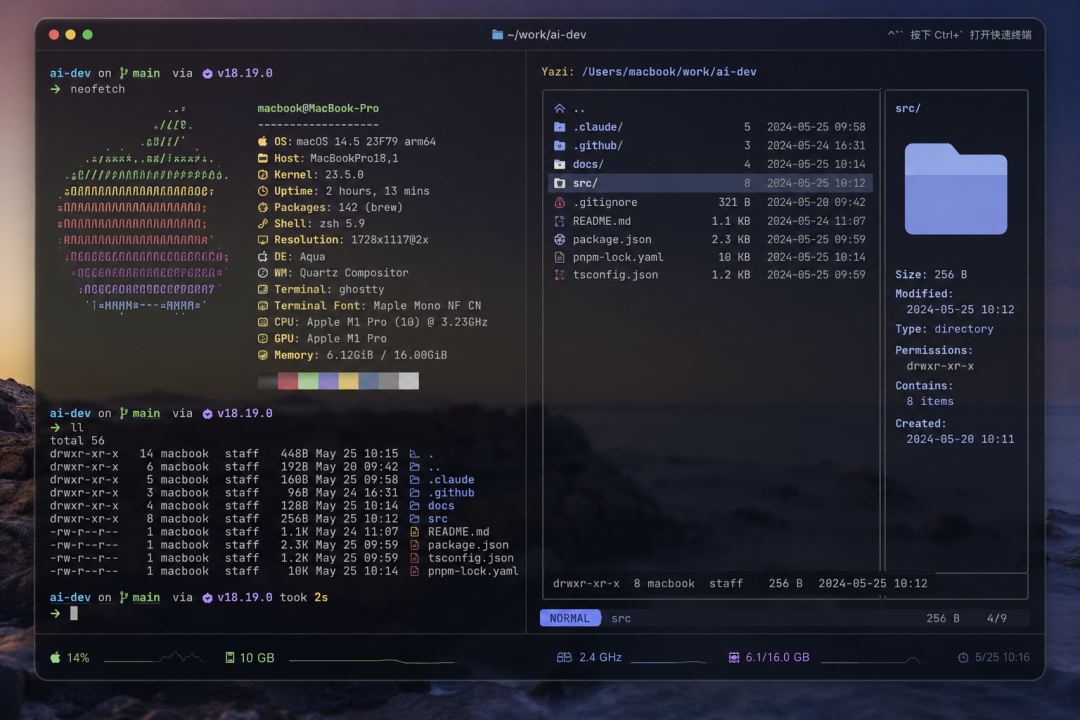
附录:快捷键汇总
Ghostty分屏 & 标签
Cmd+T | |
Cmd+W | |
Cmd+Shift+←/→ | |
Cmd+1~5 | |
Cmd+D | |
Cmd+Shift+D | |
Cmd+Alt+方向键 | |
Cmd+Shift+E | |
Cmd+Shift+Enter | |
Ctrl+`` | |
Cmd+Shift+, |
Ghostty 滚动 & 导航
Cmd+K | |
Cmd+Shift+↑ | |
Cmd+Shift+↓ | |
Cmd+Home | |
Cmd+End | |
Cmd+PageUp/PageDown |
Zoxide
z work | |
z foo bar | |
zi work | |
z -l |
Yazi
y | |
ghgc / gd / gw | |
Enter | |
Space | |
yx / p | |
dD | |
/ | |
q |