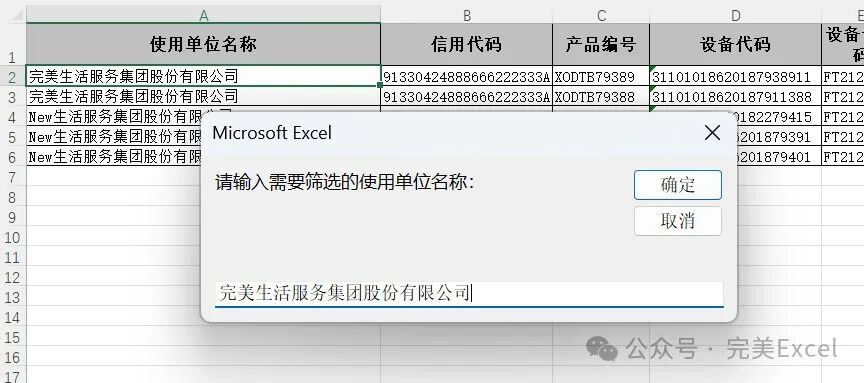
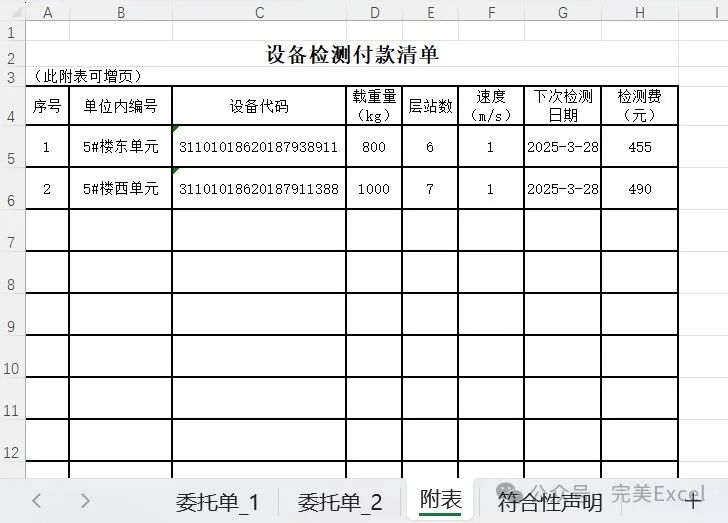
Sub GenerateNewWorkbook() Dim srcWb As Workbook, destWb As Workbook Dim infoSheet As Worksheet, tempSheet As Worksheet Dim criteria As String, lastRow As Long, i As Long, j As Long Dim headerDict As Object, dataArr As Variant, filteredData As Collection Dim ws As Worksheet, newWs As Worksheet, cell As Range Dim fieldName As String, colIndex As Long, targetRow As Long Dim rowData() As Variant
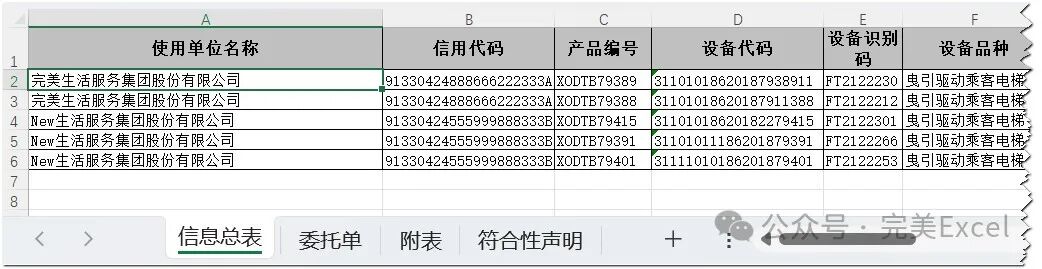
 Set srcWb = ThisWorkbook Set infoSheet = srcWb.Sheets("信息总表") criteria = InputBox("请输入需要筛选的使用单位名称:")
 ' 获取信息总表数据 lastRow = infoSheet.Cells(infoSheet.Rows.Count, "A").End(xlUp).row dataArr = infoSheet.Range("A1:V" & lastRow).Value
 ' 创建标题字典 Set headerDict = CreateObject("Scripting.Dictionary") For j = 1 To UBound(dataArr, 2) headerDict(Trim(dataArr(1, j))) = j Next j
 ' 筛选目标数据(存储整行数据) Set filteredData = New Collection For i = 2 To UBound(dataArr, 1)   If dataArr(i, headerDict("使用单位名称")) = criteria Then     ReDim rowData(1 To UBound(dataArr, 2)) For j = 1 To UBound(dataArr, 2) rowData(j) = dataArr(i, j) Next j filteredData.Add rowData End If Next i
 If filteredData.Count = 0 Then Exit Sub
 ' 创建新工作簿(不再设置SheetsInNewWorkbook) Set destWb = Workbooks.Add
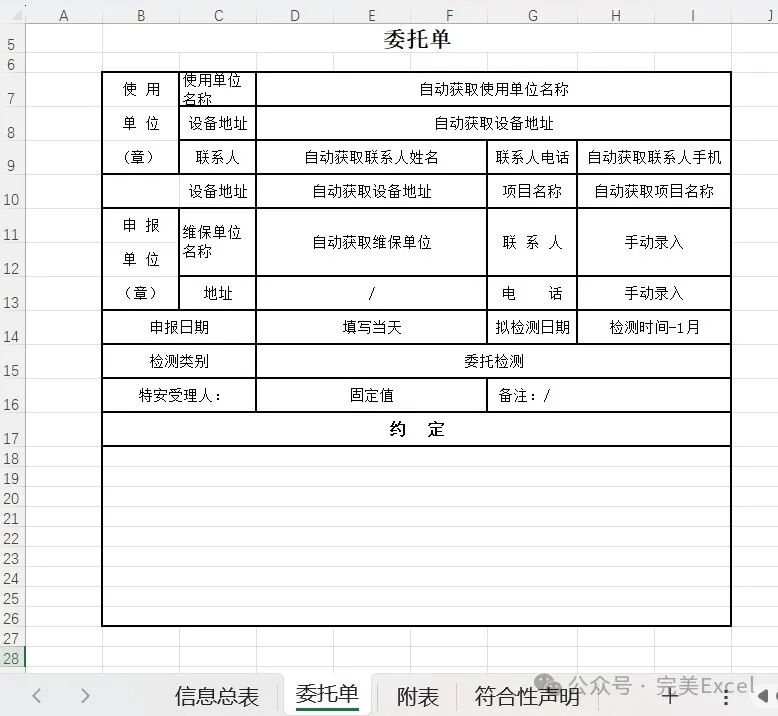
 ' ===== 处理委托单 ===== For i = 1 To filteredData.Count   srcWb.Sheets("委托单").Copy After:=destWb.Sheets(destWb.Sheets.Count) Set newWs = destWb.ActiveSheet   newWs.Name = "委托单_" & i
 ' 替换自动获取内容(新增设备代码格式处理) For Each cell In newWs.UsedRange     If InStr(cell.Value, "自动获取") > 0 Then       fieldName = Split(cell.Value, "自动获取")(1) fieldName = Trim(fieldName)       If headerDict.Exists(fieldName) Then         colIndex = headerDict(fieldName)         cell.NumberFormat = "@" ' 强制设为文本格式         cell.Value = CStr(filteredData(i)(colIndex)) ' 转换为字符串
 ' 特殊处理设备代码(保留完整数字)         If fieldName = "设备代码" Then           cell.Value = "'" & CStr(filteredData(i)(colIndex)) ' 添加单引号保留格式 End If End If End If Next cell
 ' 处理拟检测日期(修正无效引用) On Error Resume Next Dim detecDate As Date ' 提取检测时间并去除时间部分(如存在) Dim rawDate As String   rawDate = filteredData(i)(headerDict("检测时间"))   If InStr(rawDate, " ") > 0 Then     rawDate = Split(rawDate, "")(0) ' 仅保留日期部分   End If   detecDate = DateAdd("m", -1, CDate(rawDate))
 ' 找到H列最后一个非空单元格的下方插入新日期 With newWs Dim lastRowH As Long     lastRowH = .Cells(.Rows.Count, "H").End(xlUp).row     .Cells(lastRowH + 1, "H").Value = Format(detecDate, "yyyy-mm-dd") End With On Error GoTo 0 Next i
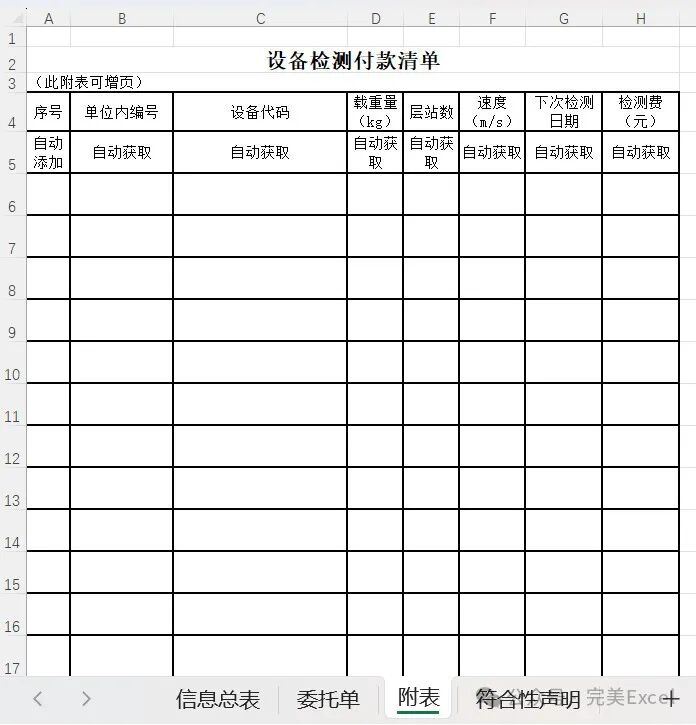
 ' ===== 处理附表 ===== srcWb.Sheets("附表").Copy After:=destWb.Sheets(destWb.Sheets.Count) Set newWs = destWb.ActiveSheet newWs.Name = "附表" targetRow = 5
 For i = 1 To filteredData.Count With newWs ' 设备代码特殊处理(C列)     .Cells(targetRow, 3).NumberFormat = "@"     .Cells(targetRow, 3).Value = "'" & CStr(filteredData(i)(headerDict("设备代码")))
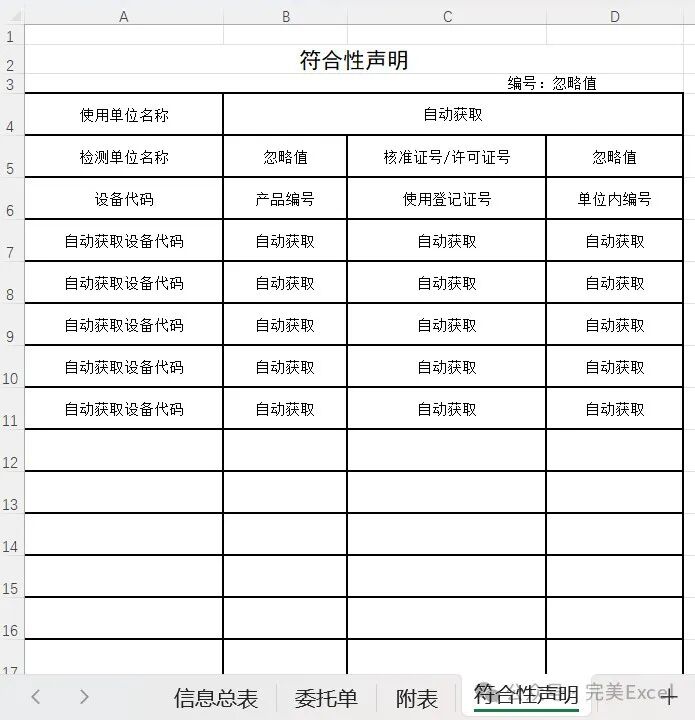
 ' 其他字段正常写入 .Cells(targetRow, 1) = i     .Cells(targetRow, 2) = filteredData(i)(headerDict("单位内编号"))     .Cells(targetRow, 4) = filteredData(i)(headerDict("载重量(kg)"))     .Cells(targetRow, 5) = filteredData(i)(headerDict("层站数"))     .Cells(targetRow, 6) = filteredData(i)(headerDict("速度(m/s)"))     .Cells(targetRow, 7) = filteredData(i)(headerDict("检测时间"))     .Cells(targetRow, 8) = filteredData(i)(headerDict("费用")) End With targetRow = targetRow + 1 Next i  ' ===== 处理符合性声明===== srcWb.Sheets("符合性声明").Copy After:=destWb.Sheets(destWb.Sheets.Count) Set newWs = destWb.ActiveSheet newWs.Name = "符合性声明"
 ' 设备代码特殊处理(A列) targetRow = 7 For i = 1 To filteredData.Count With newWs     .Cells(targetRow, 1).NumberFormat = "@"     .Cells(targetRow, 1).Value = "'" & CStr(filteredData(i)(headerDict("设备代码")))     .Cells(targetRow, 2) = filteredData(i)(headerDict("产品编号"))     .Cells(targetRow, 3) = filteredData(i)(headerDict("登记证编号"))     .Cells(targetRow, 4) = filteredData(i)(headerDict("单位内编号")) End With targetRow = targetRow + 1 Next i
 ' 删除默认Sheet1(如果存在) On Error Resume Next Application.DisplayAlerts = False destWb.Sheets("Sheet1").Delete Application.DisplayAlerts = True On Error GoTo 0
 ' 保存 destWb.SaveAs "Generated_Report.xlsx" MsgBox "处理完成!", vbInformationEnd Sub