由 Anthropic 于2024年11月提出的开放协议,旨在解决大语言模型(LLM)与外部数据源、工具的标准化连接问题。
我的理解里面,mcp 就相当于人的手。如果是大模型是模拟人的大脑,我们之前和大模型的交互一直处在对话交流的形态。
但是有了 mcp,大脑的指令就能通过手来做实际的事情。
这里实际的事情包括但不限于:
去淘宝下单购物 使用飞猪购买飞机票 使用 Blender 软件绘制 3D 工具 使用浏览器抓取某个网站 使用 Obsidian 查询和记录某个文档
所以 mcp 首先是需要有一个 client,这个 client 能处理接受用户需求,然后请求大模型,并且将大模型返回的信息分析出来指令,根据这些指令来调用 mcp 服务。
其次 mcp 要有一个 server,就是封装真实的行为的服务接口。比如我要用 Blender 软件绘制 3D 图片,那么我要在本地搭建一个 http 服务器,能调用 Blender 的各种对外接口来执行绘制。并且将这种能力提供给 mcp client。
一般来说,mcp 的 client 和 mcp 的 server 是在同一个机器上的。
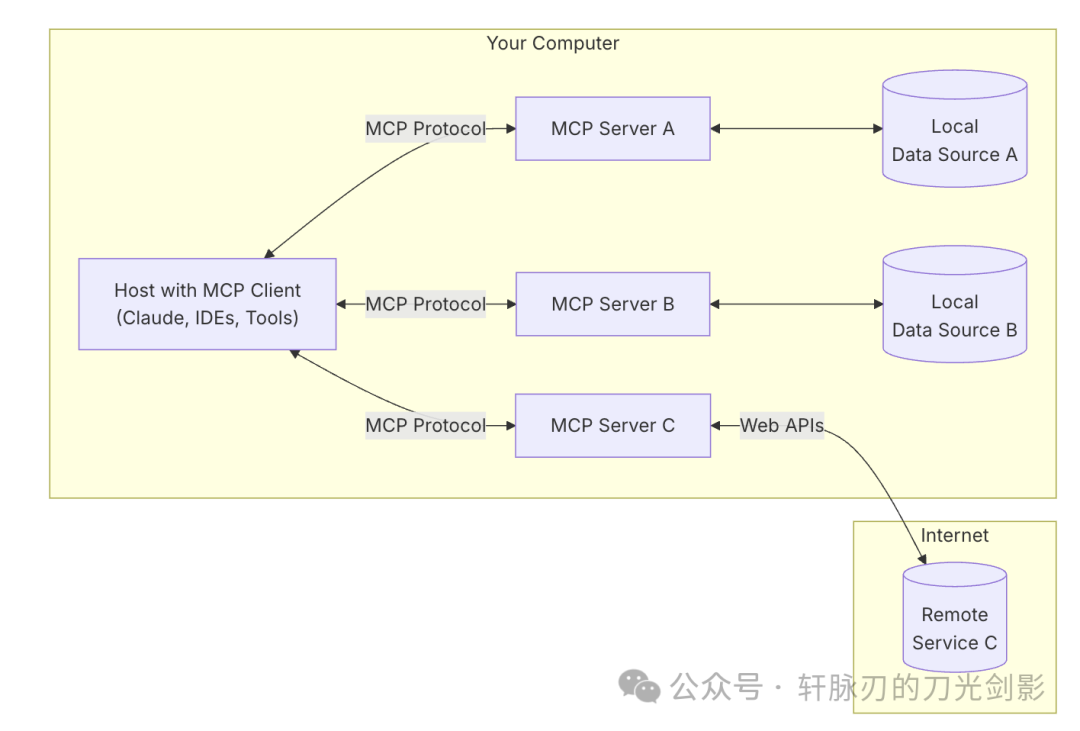
在官网这里 https://modelcontextprotocol.io/introduction 将客户端分为 MCP Host, MCP Client。其实是一个意思。Host 指的是宿主,比如像 cursor,claude app 这样的软件,其中和 MCP server 交互的部分叫做 MCP Client。
MCP 协议是怎么交互的
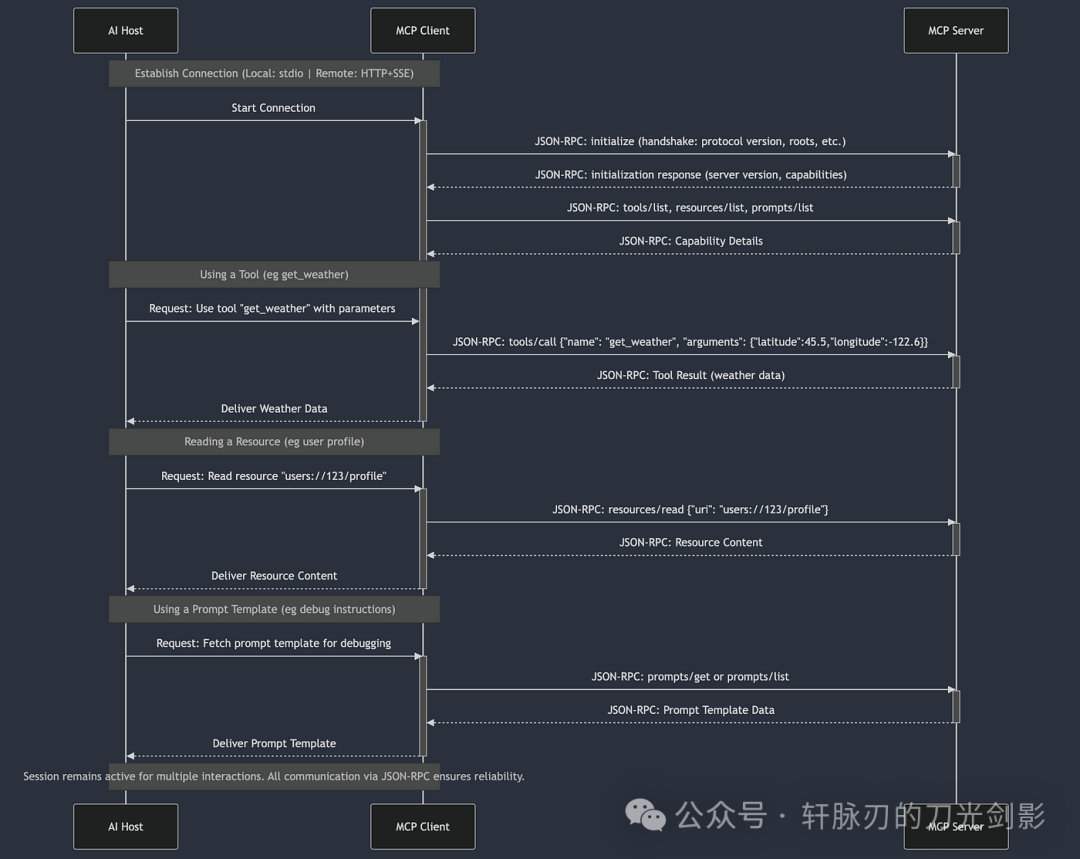
这张图就很清晰说明了。
MCP Client 和 MCP Server 交互的时候,会分别通过 tools/list, resources/list,prompts/list 来获取这个 MCPServer 提供的哪些能力。
其中 tools/list 的接口示例:
{
  "jsonrpc": "2.0",
  "id": 1,
  "result": {
    "tools": [
      {
        "name": "search_arxiv",
        "description": "Search arXiv articles by keyword",
        "inputSchema": {
          "type": "object",
          "properties": {
            "keyword": {
              "type": "string",
              "title": "Search Query"
            },
            "max_results": {
              "type": "integer",
              "minimum": 1,
              "maximum": 50
            }
          },
          "required": ["keyword"]
        }
      },
      {
        "name": "create_issue",
        "description": "Create GitHub issue",
        "inputSchema": {
          "type": "object",
          "properties": {
            "repo": {"type": "string"},
            "title": {"type": "string"},
            "body": {"type": "string"}
          },
          "required": ["repo", "title"]
        }
      }
    ]
  }
}
resources/list 的接口示例
{
  "jsonrpc": "2.0",
  "id": 2,
  "result": {
    "resources": [
      {
        "uri": "file:///var/log/app.log",
        "name": "Application Logs",
        "mimeType": "text/plain",
        "description": "Real-time server logs"
      },
      {
        "uriTemplate": "postgres://db/users/{user_id}",
        "name": "User Records",
        "mimeType": "application/json",
        "description": "Query user data by ID"
      }
    ]
  }
}
prompts/list 的接口示例
{
  "jsonrpc": "2.0",
  "id": 3,
  "result": {
    "prompts": [
      {
        "name": "generate_report",
        "description": "Generate technical report template",
        "argumentsSchema": {
          "type": "object",
          "properties": {
            "title": {"type": "string"},
            "sections": {
              "type": "array",
              "items": {"type": "string"}
            }
          }
        }
      },
      {
        "name": "explain_code",
        "description": "Generate code explanation",
        "argumentsSchema": {
          "type": "object",
          "properties": {
            "code": {"type": "string"},
            "language": {"type": "string"}
          },
          "required": ["code"]
        }
      }
    ]
  }
}
如上我就提供了几个如下的功能。
调用 tools/search_arxiv获取论文通过 resources/read加载本地参考文献使用 prompts/summarize生成文献综述
如何在本地安装一个MCP Server
官网的 https://modelcontextprotocol.io/quickstart/server 有教你如何本地安装一个查看天气的 MCP Server。
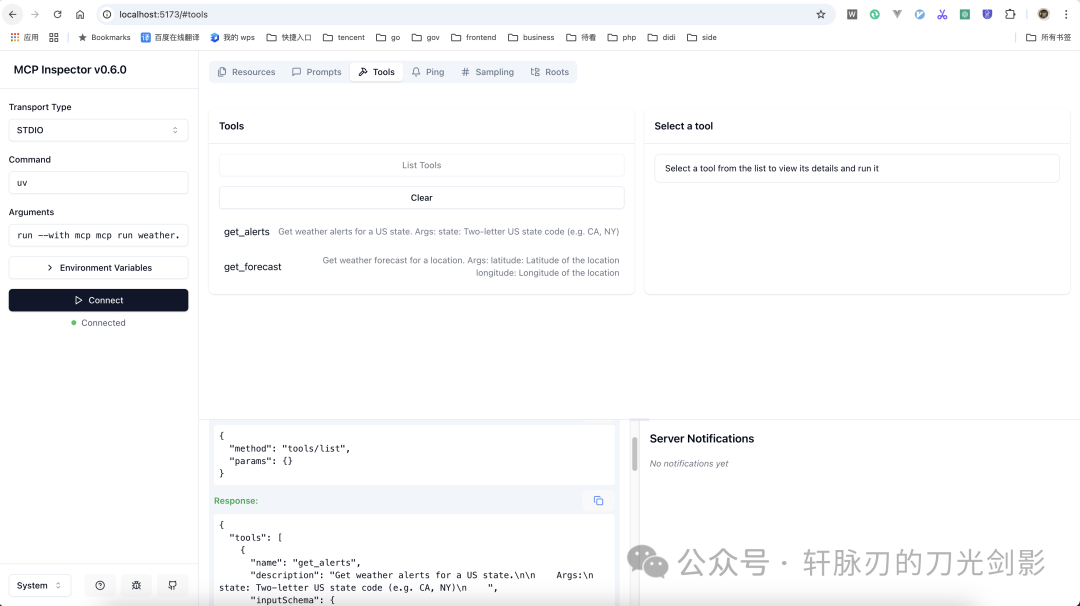
这个 MCP Server 提供了两个工具 :get-alertsandget-forecast
我自己亲测,官网的这个是可行的。
这里说几个官网没有说到的点:
我想调试一下这个MCP服务
mcp 命令
图形化调试工具,可实时测试工具/资源/提示的执行效果 启动命令: mcp dev weather.py(这个命令要在 venv 环境下运行)
(weather) ➜  weather git:(master) ✗ mcp dev weather.py
Need to install the following packages:
@modelcontextprotocol/inspector@0.6.0
Ok to proceed? (y) y

Starting MCP inspector...
Proxy server listening on port 3000

? MCP Inspector is up and running at http://localhost:5173 ?
在本地浏览器打开 5173 端口,出现页面
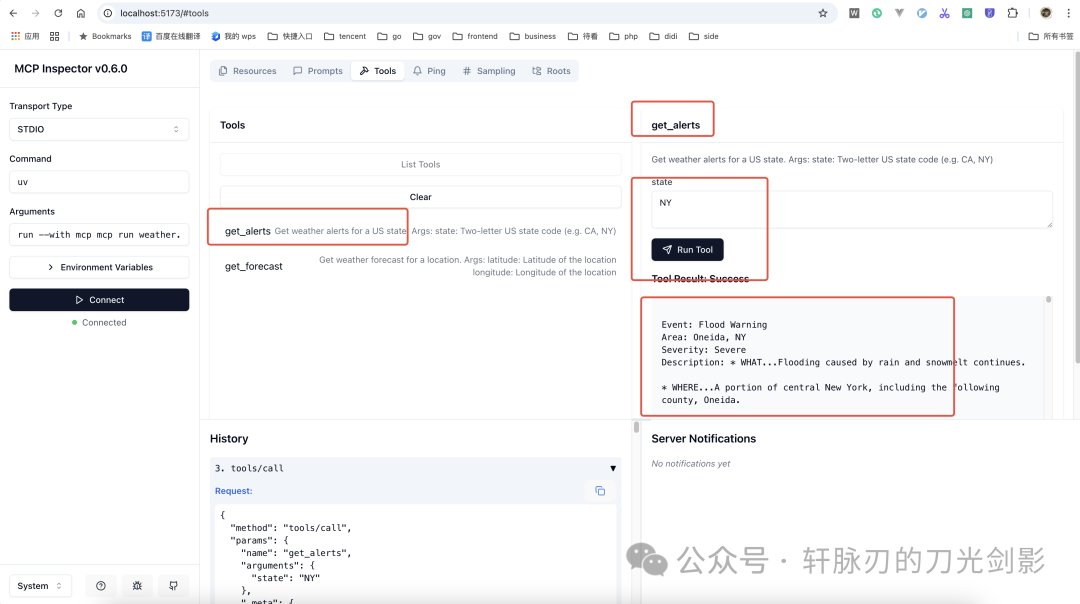
你也可以很方便在上面调用某个 tool 工具
cursor 工具中如何配置这个MCP Server
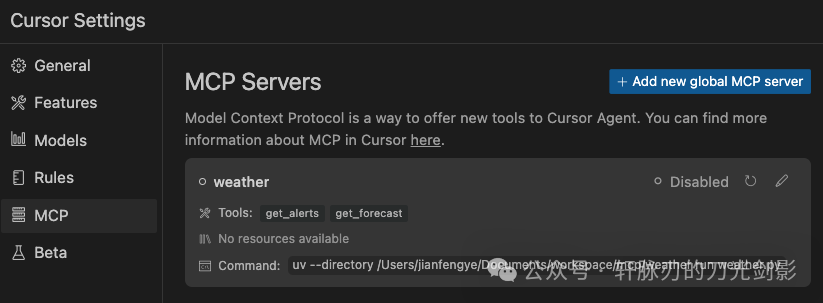
我们这个 MCP Server 是通过 uv 命令启动起来的,它的配置文件如下:
{
 "mcpServers": {
  "weather": {
   "command": "uv",
   "args": [
    "--directory",
    "/Users/jianfengye/Documents/workspace/mcp/weather",
    "run",
    "weather.py"
   ]
  }
 }
}
在 cursor 配置好,enable 就能看到这个服务提供的 tools
你可以在 cursor 中使用 @mcp 来询问美国纽约的天气
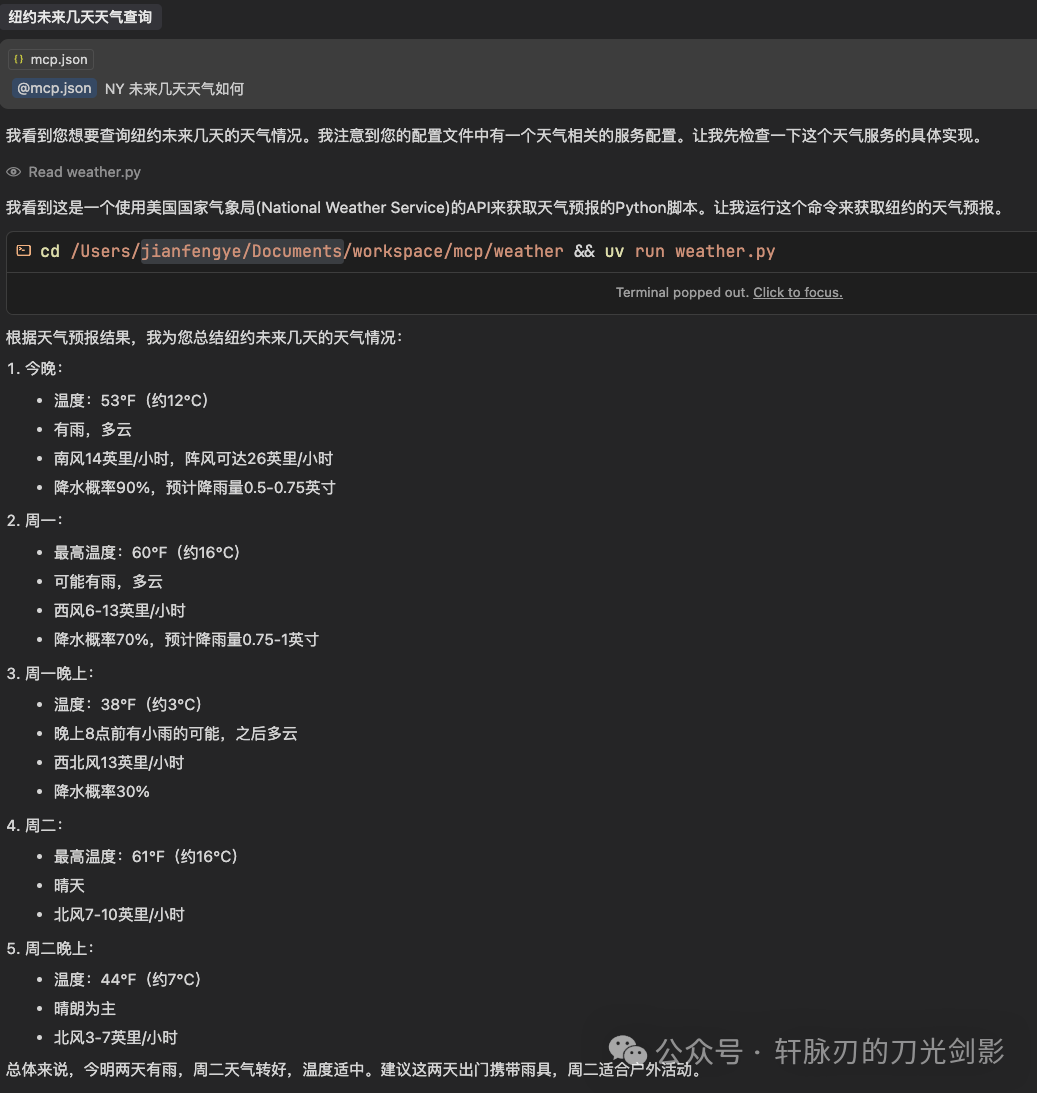
这里注意的点就是官网给出的接口只能查询美国的,所以不要尝试查询中国地区的天气。
有哪些现成的MCP 服务
开源社区有一个:https://github.com/punkpeye/awesome-mcp-servers
可以访问 https://glama.ai/mcp/servers 进行查询。
Claude 官方也创建了一个 MCP Server 集中地:https://cursor.directory